Jobsite Ready Team · for roofing crews

Load it right. Leave once.

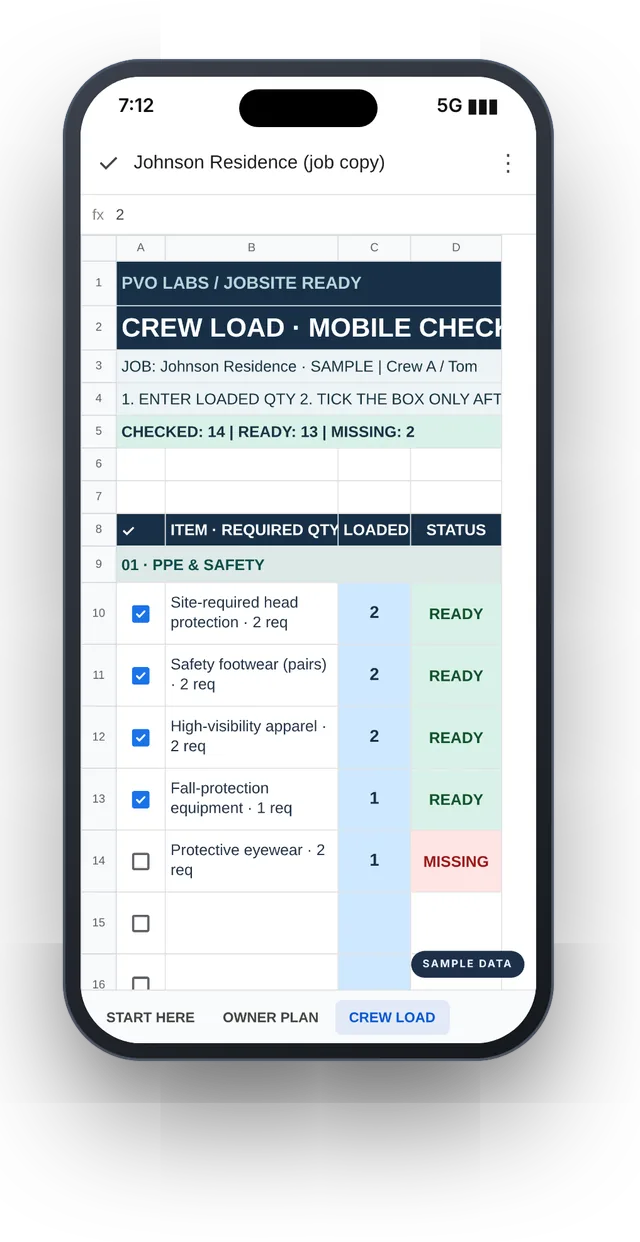
You plan the job on your laptop tonight. Your crew checks every item on their phone in the morning. You see what is READY and what is MISSING before the truck pulls out.

$69.99one-time
no subscription
Get Jobsite Ready Team · $69.99
  • Google Sheets template
  • Unlimited job copies for your company
  • 14-day refund
Jobsite Ready Team in Google Sheets: the owner plan on a laptop and the crew load checklist on a phone, with sample data
Sample data Real screens · owner on the laptop, crew on the phone
The problem

One missing box of nails costs you a trip.

The truck is on site, tear-off has started, and the fasteners, the flashing or the second tarp are still at the shop. Every roofer has lived that morning.

01

Somebody drives back

Time on the clock, fuel, and a crew standing around until the run gets back.

02

“I thought you loaded it.”

When nobody owns the list, everybody assumes someone else checked.

03

Paper doesn't talk back

A clipboard in the cab can't tell you, from home, that the eyewear count is short.

How it works

Owner plans. Crew checks. Truck leaves.

  1. OWNER PLAN tab: job details, item names, required quantities and live status, with sample dataSample data
    Step 1 · Tonight · laptop

    Plan the job.

    Open OWNER PLAN. Set the job, crew and truck. Edit item names and quantities, add your own lines.

  2. CREW LOAD tab on a phone: checkbox, item and required quantity, loaded quantity and status, with sample dataSample data
    Step 2 · Morning · phone

    Load and check.

    Your crew opens CREW LOAD, enters what they loaded, then ticks the box only after checking the item.

  3. Step 3 · Before departure

    Fix the gaps. Then go.

    Every line shows its status live. Resolve each MISSING or TO CHECK line before the truck leaves.
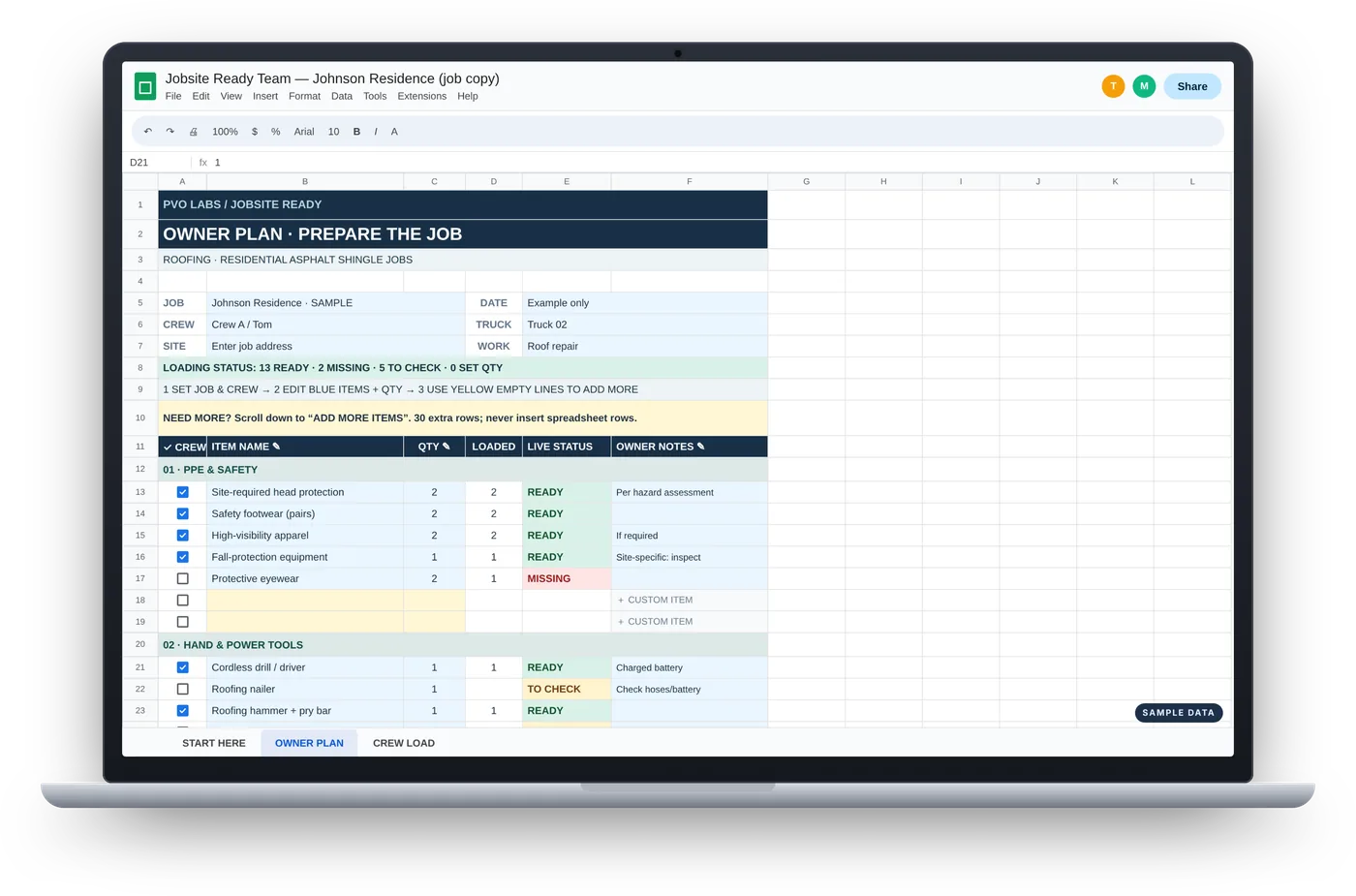
Laptop showing the OWNER PLAN tab of Jobsite Ready Team with sample data
Owner side · laptop

Your plan. Your list.

  • 20 roofing items ready to go, in 5 sections: PPE, tools, large equipment, materials, final departure
  • Edit the blue names and quantities, fill the yellow rows, then add up to 30 more items
  • A live count at the top: READY, MISSING, TO CHECK, SET QTY
  • Owner notes per item, like “Check type/color”
  • Change an item after loading starts and that line goes back to TO CHECK
Phone showing the CREW LOAD tab of Jobsite Ready Team with sample data
Crew side · phone

Count. Enter. Then tick.

  • One simple list, built to read on a phone
  • Crew can only type in their own cells. The owner plan is protected
  • A short count shows MISSING right away
  • Opens in the free Google Sheets app or a phone browser. No new app to learn
Read the truck at a glance

Four words. No guessing.

READY

Checked, with a loaded quantity that meets the requirement.

MISSING

Loaded quantity is below the required quantity.

TO CHECK

Confirmation or loaded quantity is still incomplete.

SET QTY

The owner must enter a valid required quantity above zero.

In real life

Plan at the table. Check at the truck.

Roofing company owner planning tomorrow's job on a laptop at the kitchen table
The night before. Set the job, the crew and the quantities before the morning rush.
Roofing crew loading a pickup truck in the morning while checking a list on a phone
At the truck. The crew checks each item on the phone as it goes in.

Illustrative photos.

What you get

One price. Every job.

  • The Jobsite Ready Team Google Sheet: START HERE, OWNER PLAN, CREW LOAD
  • A roofing starter list for residential asphalt-shingle jobs, ready to edit
  • Protected crew cells and a built-in guard that resets a line when you change it
  • Template shared to your Google account within 1 business day, plus a Quick Start PDF
  • Unlimited job copies for your company, shared with your own crew
  • Email support from the person who built it
Jobsite Ready TeamOne-time purchase
$69.99USD · no subscription
  1. Enter your Google email above, then check out.
  2. Within 1 business day we share the template with that account and email you the link.
  3. Make your own copy and keep it as your clean master. The Quick Start PDF downloads right after checkout.

14-day refund. If it's not right for your crew, email us within 14 days of purchase for a full refund.

Good to know

What it is. What it isn't.

It is

  • A pre-departure loading checklist in Google Sheets
  • Shared live between the owner and the crew
  • Yours to edit for every job

It isn't

  • A safety program. It does not replace site safety assessments, equipment inspections, applicable rules or trained supervision
  • An offline app. Live updates need a connection
  • Inventory or scheduling software
Questions before you buy

Straight answers.

How do I get it after I pay?

Before checkout, you enter the Google account email you want to use. Within 1 business day of payment we share the template with that account and email you the link. You also download the Quick Start PDF right after checkout. Open the template, choose File → Make a copy, and keep that copy as your clean master. Nothing after 1 business day? Email us with your order number.

Is it a subscription?

No. You pay $69.99 once. One purchase covers one company, with unlimited job copies for your own crew.

Does my crew need a Google account?

Yes. To tick boxes and enter quantities, each crew member needs a Google account (a free one works). You invite them by email to the job copy only.

Does it work on iPhone and Android?

It runs in Google Sheets, so your crew opens it in the free Google Sheets app or in a phone browser.

Does it work without signal?

Live updates need an internet connection. Check the truck where you have signal.

Can I change the items?

Yes. Edit the blue names and quantities, use the yellow empty rows, then the 30 extra rows at the bottom. Never insert spreadsheet rows.

Can my crew mess up my plan?

Crew cells are protected: they can only tick the box and enter the loaded quantity. Protections keep the crew in their cells; they do not make the file private, so share each job copy only with your own crew.

Is it only for roofing?

The starter list is built for residential asphalt-shingle roofing. You can rename items for repairs or other trades, but the ready-made list is roofing.

What if it's not right for my crew?

Email us within 14 days of purchase for a full refund. No forms.

Tomorrow's truck, loaded right.

Plan tonight. Load together. Check before departure.

$69.99 one-time · Google Sheets · 14-day refund · Questions? contactpvolabs@gmail.com

Looking for our other systems? See all PVO Labs systems