


PVO LABS · BUSINESS SYSTEM
Paperwork Recovery System
Paperwork Recovery System
Monthly or annual plan · Cancel anytime · Google Sheets
$299/year · best value, save $109 vs monthly
$34/month · cancel anytime
Your copy link and license key arrive by email, usually within 15 minutes. 14-day refund on your first payment. Not sure it fits? Get a free audit.
Your clients send their paperwork. You stop chasing.
Paperwork Recovery System is a Google Sheets system for small firms that wait on documents from their clients: tax preparers and accountants, bookkeepers, and contractors collecting paperwork from subcontractors. You add a client and pick START REQUEST. The system sends the request, reminds the client politely until everything is in, and tells you when a file arrives so you can check it.
What it does for you
- Sends the request and the reminders for you, from your own Gmail, under your business name and signature.
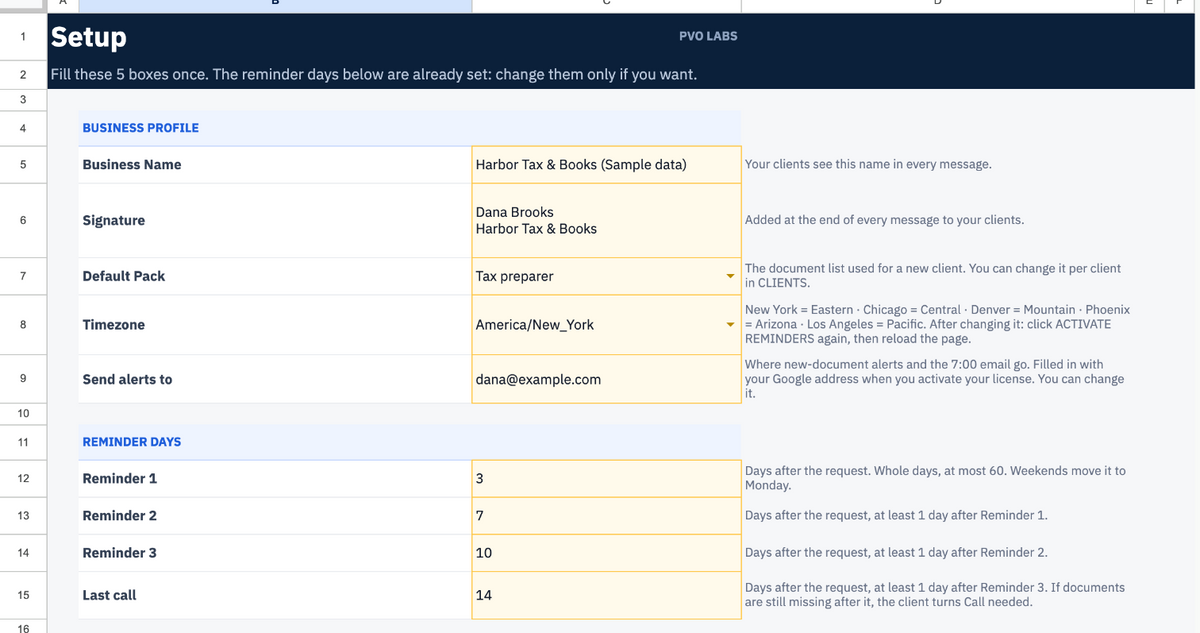
- Five messages at most, then it stops. By default: request on day 0, reminders on days 3, 7 and 10, last call on day 14. You can change these days in SETUP. Weekdays only. Each reminder lists only what is still missing.
- Gives each client a private upload page. No account and no password for your client. They pick the document, send a file or a phone photo, done.
- Checks every file automatically: accepted formats only (PDF, JPG, PNG, HEIC, Word, Excel), empty or tiny files refused, renamed programs refused, duplicates flagged.
- Alerts you at each upload. You open the file and tick Right or Wrong. Wrong sends the client a polite request to send it again, with the reason.
- Pauses on its own while a file waits for your review, and stops the moment everything is received.
- Tells you when to pick up the phone. After 5 messages with documents still missing, or 3 wrong files for the same document, the client turns to "Call needed" and you get one email.
- Sends you a 7:00 summary only when something needs you: files to check, clients to call.
Ready-made document lists
Five packs are included, and you can edit any of them or add your own:
- Tax preparer (once a year): W-2, 1099-NEC, 1099-INT, 1099-DIV, 1098, 1095-A, last year's return, photo ID, and more
- Tax preparer — self-employed (once a year): 1099-NEC, 1099-K, profit and loss summary, estimated tax payments, mileage log, and more
- Bookkeeper (every month): bank and credit card statements, receipts, payroll report, and more. The request restarts on the first weekday of each month, and anything still missing from last month is carried over, never dropped.
- Contractor — new subcontractor: W-9, certificate of insurance, workers' comp certificate or exemption, contractor license, signed subcontract agreement
- Contractor — payment: invoice and lien waiver
A document doesn't apply to one client? Mark it Not needed, or let the client tell you from the upload page. One client needs an extra document? Type it on that client's row.
Your files stay yours
- Every file goes straight into your own Google Drive, in one folder per client. PVO Labs never receives or stores your clients' documents.
- Each upload link is unique, long and random, and you can replace it in one click.
- The system never reads your Gmail. It only sends.
- No AI reads your clients' documents.
What you receive
- Your own copy of the Google Sheet, in your Google account
- START HERE guided setup in 6 steps, with a built-in CHECK MY SETUP
- CLIENTS, INBOX, LISTS, SETUP, TEMPLATES and HELP tabs
- Editable message templates
- An install guide with screenshots
- One Standard license for one purchaser, one business and one activated Google Sheet
Setup
About 20 minutes on a laptop or desktop computer. No coding. Once it's set up, you can work from the Google Sheets app on your phone.
Good to know
- Google's sending limit: messages go out from your Gmail, so Google's daily limit applies (about 100 recipients a day on a free Gmail account, 1,500 on Google Workspace). That's plenty for a small firm, not for 300 clients on the same day.
- Google shows a "this app isn't verified" screen when you first authorize the system. The install guide shows what to click.
- Some Google Workspace accounts block public pages. CHECK MY SETUP tells you if yours does, and HELP explains the fix.
- No text messages in this version. Email only.
Requirements
- A Google account (a free Gmail account works)
- A computer for the initial setup
Pricing: $34/month or $299/year for one purchaser, one business and one activated Google Sheet. The yearly plan saves $109 versus 12 monthly payments. Plans renew automatically; cancel anytime before your next renewal.
14-day refund: if it's not right for your firm, email us within 14 days of your first payment and we refund it in full. No reason needed.
Delivery: your license key and your copy link arrive by email, usually within 15 minutes of payment and always within 1 business day.
Not sure it fits? Start with a free Revenue Leak Audit.


QUESTIONS BEFORE YOU BUY
Is it a subscription?
Yes. Choose $34/month or $299/year (the annual plan saves $109). Plans renew automatically; cancel anytime before your next renewal. If it's not right for you, email us within 14 days of your first payment for a full refund.
Do my clients need an account?
No. Each client gets a private upload link. They pick the document, send a file or a phone photo, and that's it.
Where do the files go?
Straight into your own Google Drive, one folder per client. PVO Labs never receives or stores your clients' documents, and the system never reads your Gmail.
Can I use the license on multiple copies?
No. One license activates one Google Sheet for one business. Contact support if you legitimately need to replace the activated file.
Do I need technical skills?
No coding is required. Setup takes about 20 minutes on a computer, with a step-by-step guide and a built-in CHECK MY SETUP.